Tuesday, July 07, 2009

Canon G10 - my first impressions


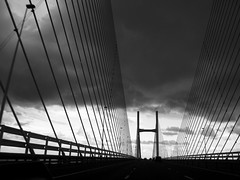
severn bridge
Originally uploaded by Nevoir.

After a week of using the Canon G10 I though it timely to post a few first impressions.

Many of these points are not unique to the G10 but will stand out if you, like me, are getting used to using a point and shoot digital after an SLR.

What is great about the G10?

The size of the screen is a stand out feature. The resolution of the screen is fantastic and makes composing and reviewing a breeze. You'll need to shield it from bright sun as it makes it almost impossible to see anything on the screen.

The live histogram is a great feature that helps to make better exposures first time. It gives great feedback in manual mode of the effects of changing apertures and shutter speeds which helps you to maximise the tonal range in your images. The screen also darkens/ lightens to give additional feedback about the impacts of your adjustments.

The camera gives you the choice of seeing everything or nothing in terms of settings on the screen. You can choose to see the classic two thirds composition aid which is a great tool. I found with so much noise it can make composing an image with the screen really difficult. You can choose to see fewer settings but this removes the crucial ones which is frustrating.

Manual controls

I was interested to see the extent to which you could manually control the camera. It actually is quite powerful and is a great mode to use if you want to take complete control. The one surprising constraint is a minimum of f8 which is usually the half way point within your aperture options.

Of course the most important element is picture quality. From what I have seen the G10 delivers fantastic image quality provided you support the camera properly. An old rule of thumb with an slr is to never shoot at a shutter speed that is less than the focal length of the lens. So if you are using a 50mm lens then dont drop below 1/60th second. The G10 makes it difficult to know what focal length you are shooting at but it will warn you if are likely to get camera shake.

I bought a retro leather wrap over case (SC-DC60A) to protect the G10. It looks great but is taking a bit of getting used to with the poppers and nowhere to store a spare battery or card. Possibly a case of style over substance (quite literally). I like the way that the case screws into the tripod screw thread but it make getting to the SD card difficult.

Raw shooting

The option to shoot raw is a big draw and I see no reason why I will ever change it to shoot jpeg given that SD cards are so cheap.  I wouldn't have bought a camera without raw as an option and this will be a primary concern for many of you looking for a good quality digital compact.

One of the great things things about these types of cameras is that their portability makes it more likely that you will take them out with you. Also i've noticed that with this camera i'm more likely to bother taking a few shots than I might with an slr. This has already meant that i've got a few shots that I would never have got with an slr. 

 What has bugged me about the G10?

There are various things that have taken a bit of getting used to. With an slr in say aperture priority mode its easy to see what shutter speed you will get at a chosen aperture. With the G10 you have no idea until you half press the shutter release which is annoying.

The viewfinder is like the cameras appendix, a throwback to a once useful tool that has been superceded. The viewfinder is pretty much useless, when you look through it you dont get any info on any of your camera settings. Worse still when you zoom in and out the field of view remains the same so its useless for composing.

I was annoyed to find out they had removed the time lapse feature that was available with the G9. You can buy a remote release with a timer to get the same effect but its annoying that you need to buy another tool to do this.

Its certainly not the cheapest camera but i'm sure i'll get my moneys worth as it'll get a hammering if i've got it with me all the time. 

Summary

If you are after a very good quality second camera to have with you all the time you won't go far wrong with the G10. It offers a great trade off between features and portability and i'm looking forward to seeing how it will improve my photography.


Wednesday, July 01, 2009

Night photography tips


One of the most rewarding aspects of night photography is that you never really know what you are going to get. When shutter speeds start to extend beyond the norm you get some wonderful shifts in light and colour that you will never see with the naked eye.

It is these unknowns that can help to breathe new life into well known and photographed landmarks such as the clifton suspension bridge. It also gives you some great photography options during the winter months where it becomes a bonus that its dark when you leave work.

So how do you go about getting shots like the one above? It's really an extension of the same techniques that you will use for landscapes but of course everything takes a little longer.

Shooting in low light presents some unique problems to the photographer. First and foremost if you want to shoot with small apertures such as f16 & f22 then your shutter speeds are going to be in the region of seconds which of course means you'll need a tripod. 

If its the darker side of dusk then i'll generally start in aperture priority at f8 and see what shutter speed i'm getting. Make sure your ISO is as low as possible as at long shutter speeds digital files can get really noisy (grainy) which looks nasty on screen.

Generally the approach is to experiment. Take a shot at f8 and see what you get. With traffic in the shot you'll never get the same shot twice so take loads to increase your chance of getting lucky.

My camera has a noise reduction mode which cleans up the images once they are taken to help to cope with that noise problem I mentioned. This is great but can take ages and hammers the batteries, particularly if its cold. You generally don't have a choice but to use it so make sure you have plenty of spare power.

Exposure is generally trial and error but you can get a good starting point from spot metering off the brighter area of the sky so that you will not burn it out when you shoot. In the shot above I metered from the area above the bridge and bracketed to try adding and removing exposure until I got the effect I wanted.

One vital point is that you'll need to trigger the camera by some sort of remote release or self timer. If its windy take the strap off your camera as this will cause some unsharpness. You should also avoid shutter speeds of between 1/10th - 1" second as the mirror in your slr can also cause some vibration.

The best time to shoot these shots is around dusk. You'll get some great colour in the sky and your shutter speeds will still be manageable. With a bit of natural light around you will find that focussing is so much easier too.

If you want to get a shot like the one above find the slide on the rock on the clifton side of the bridge and you will get some great light in the western sky as the sun drops over Avonmouth.


Thursday, June 25, 2009

A lesson learnt


mc hammer lives in brislington
Originally uploaded by Nevoir.


I generally try and make time to take pictures. Often i'll get stuck into work in the week and decide that I will do take some photos during the weekend in order to feed the habit. This doesn't seem to be working. Surely the perfect balance is to try and weave photography into everyday life. This is the new plan.

Part of this plan if i'm honest seems to be an elaborate  way of justifying getting myself a compact camera that I can sling in my bag and take with me everywhere as my slr is just too big. I think i'm going to get the Canon G10, shoots raw, nice big screen and not too big.

The importance of just having any old camera with me struck me after posting this shot of a local sign to flickr a couple of weeks ago. Its received more views, comments etc than any shot i've posted that have been meticulously taken with expensive kit. The mc hammer shot was taken with a little ixus, the camera is irrelevant, its all about the photo. 

Don't get too obsessed with kit, the magazines will make you think you need all sort of gubbins but you'll be amazed how much you can do with a basic camera and a 50mm lens. If you go out and spank a fortune on a camera that you are too worried about taking out of the house then what's the point?

The best advice that i'm trying to follow is that as a photographer you should have your camera with you everywhere you go. This is great advice. Not only will you never miss an opportunity but you'll be taking pictures every day and as a photographer you'll be indulging your passion. I'm off to the camera shop (again).

Wednesday, June 10, 2009

Trying something new...


_DSC0428
Originally uploaded by Nevoir.

After having been inspired by a recent Chase Jarvis blog about trying something new I took his advice and had a go at combining two great passions of mine, photography and golf.

The shot above is one of many I got from a fantastic evening shoot at a local course during which I was lucky to get both some good light and free reign of a pretty deserted course.

What struck me as I was taking the shots was how I go through a series of steps when taking a photo that I always go through but never really give much consideration at the time.

In the interests of sharing know how i've outlined some important things to consider when you are out with your camera.

1. Choose your composition

I always use a tripod for this type of shot. The problem with tripods is that they are a hassle to adjust. Frame your shot with your camera in your hands then set up your tripod to suit. 

I recently switched from a pan/ tilt tripod head to a ball head and love it. It's so much quicker and easier to use and is smaller and lighter to boot.

2. Check your camera

Check your ISO, white balance and quality settings regularly. You can correct the white balance at home if you are shooting raw but if your quality and ISO are off the mark you could well have wasted a day shooting. 

3. Decide what you are trying to do

The camera allows us to control what effect we get from our resulting photo. If we want to freeze or blur motion we can set the shutter speed to get the effect we want. If we are primarily concerned with depth of field we can control the aperture. This is a key decision.

Landscape photographers as a rule are primarily concerned with depth of field. Typically, we like a wide depth of field which renders the whole scene in focus. This often results in long shutter speeds being required to make a properly exposed photograph.

For the shot above all I was interested in was maximising the sharpness and optical quality of the shot. The sweet spot of any lens is when it is set to f8, so I set the aperture to f8 and adjusted the shutter speed to suit. 

I wasn't interested in what the shutter speed was as the camera was on a tripod and I wasn't trying to get any shutter speed effects like blur or whatever.

One other shot I should have tried is to get a bit more movement in the flag. To do this I would have set the shutter to say 1/30th, tweaked the aperture to give a correct exposure then took a shot to see if 1/30th gives enough movement.

It's all about deciding what you are trying to do and then experimenting until you nail it, pixels are free so play around with different effects. The best way to learn is to stick the camera in manual mode and go from there to make sure that you are making all of the decisions and you can see the results of the decisions that you are making.

4. Review the scene

Rest assured that however you have composed your shot you can always improve it. Check the entire scene for distracting elements such as litter or stray vegetation. Make sure your camera is level by investing in a hot shoe bubble level...only about a tenner but will last forever and you'll use it every time.

5. Try a variation of what you are doing

There is nothing more annoying that after bothering going to a location and doing everything right to get home and when reviewing your photos to think if only I had tried something else with that scene.

When you are in the field just try something else. If just one of these variations works out it will have been worth it. If it doesn't work just delete it, it's that simple.

------------------------------

Kit shopping list:

Hot shoe bubble level

Manfrotto Ball Head


Tuesday, May 05, 2009

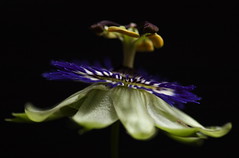
Flower macro lit by flash...


Flower macro
Originally uploaded by Nevoir.

Well after a lengthy unintentional sabbatical from this photo blog its time to resurrect things.

This shot follows a couple of weeks of study around off camera flash. The source of knowledge was inevitably Strobist and the catalyst was buying a set of Elinchrom Skyport radio triggers from the guys at London Flash Centre.

I've been following the Strobist blog for years and always meant to get my head down and follow the lighting 101/ 102 tutorials. It turned out that the best route in for me was to get the strobist dvd and go from there. It is a fantastic learning resource and I found it the best way to join the dots of my patchy knowledge.

This shot was really quick to set up and can be done and dusted in 20 mins.

Anyway, the recipe for this shot is as follows.

You will need:

- Subject
- Something to trigger the flash
- Flash with something to diffuse the light
- Camera + tripod etc...
- Macro lens

1) Set up camera and tripod and choose your first composition with your subject.

2) Choose what you want to focus on while the main light is on as once the lights are out autofocussing becomes almost impossible.

Once you've selected your focus knock the auto focus to manual so that it wont shift. For this shot I chose to focus on the yellow "eyes" as they were an interesting feature.

3) Set up your flash and diffuser (I used a shoot through brolly) and position it as close as you can to the subject (from camera left).

4) Check your flash is triggering and that your subject is getting the light coverage you want.

5) Set your camera to manual mode and set the shutter to its synch speed. My D70 will synch up to 1000th sec but I went for 500th sec for this shot. A super fast shutter will leave you with a really, really under-exposed exposure which gets you that black background (without needing to bother using a piece of black card or whatever).

If you cant synch that fast don't stress, your cameras synch speed should be fast enough to knock the background out as long as your environment isn't too bright.

So your shutter speed gives you your black background and to get the narrow depth of field I chose an aperture of f4. The job of the flash is to illuminate the subject. This point of the shutter controlling the natural or ambient light and the flash controlling the light on the subject is absolutely fundamental to understanding how this stuff works.

6) Set the flash to manual and choose a setting to start with. The final setting on the flash was 1/8th power.

7) Turn the main lights out and set the white balance on the camera to Flash. I shot this at ISO 200 and shot raw files as ever.

8) Take a test shot using a cable release or use the self timer. It's probably not strictly necessary for this sort of shot with flash but its a force of habit and good practice I guess.

9) Check your histogram to see how close you are. If you are too dark either boost the flash power or move it closer if you can. You can also open up the aperture if you want but if you want f4 then change the flash to suit.

Whatever you do don't try and learn about the law of reciprocity which explains how this flash/ subject ratio all works because your eyes will bleed.

10) If you don't like the strong shadow on the right hand of the subject just hold some white card on that side to bounce some light back into the shadows.

This kind of shot is perfect for when the weather is too bad for a landscape session or its dark because you're back from work late and you've just got to create something.

Tuesday, January 16, 2007

Macro tastic


flower
Originally uploaded by Nevoir.

After reading Scott Kelbys excellent "Digital Photography" book I felt inspired to apply some of the stuff that I had picked up and spent a great few hours last weekend getting some new macro shots.

The approach of the book is to offer advice as if the author was there to ask directly how to get the shot. What this turns into is the equivalent of recipes for photos, which if you follow you cant help but get something like the picture that they show in the book.

This isn't to say that this photo lark is formulaic but you can't get away from the fact that there's a fair bit of technique going on here that anyone can follow to get some great results.

So following suit I thought i'd pass on the love and follow a similar format here. So in a true recipe format here goes, this is the recipe I followed to get this shot.

What I used:

  • window with some diffused light coming through it
  • tripod
  • flower (go and get some cheap blooms from the supermarket)
  • camera and a remote release
  • macro lens
  • water sprayer (the shower works well if you haven't got one of these)
  • black background (I used a suitcase!)


How I got the shot:

  • sit next to a window and position the flower so that its getting a good amount of light
  • if it's a bright sunny day diffuse the light that hits the flower by putting some tissue paper or a shower curtain between the window and the flower. If your neighbours asks you why you are putting a shower curtain up in your bedroom lie to them!
  • set your background a few feet behind the flower so it goes nice and black when you take your shots
  • set your white balance on the camera, check you are using the lowest ISO and set the shot up so its all level
  • use raw if you can as it gives you much more flexibility later on
  • get your camera at the same height as the flower, this nails the depth of field effect if you are shooting at f5.6 or a similar wide aperture
  • spray the flower to get some good beads of water
  • set the camera to aperture priority and choose what aperture you want (this shot was at f 5.6)
  • take a shot (using a remote release or your self timer) and see what you get
  • check your histogram and re-shoot until you get some info in the graph up to just off the end of the far right hand side
  • take loads of shots at different apertures, you are bound to prefer some more than others once you check them over on the computer


Tips

  • keep everything as still as possible, if you can lock your mirror up then do it. If you get comfortable you wont shift about and ruin the shot
  • try and get the white balance and exposure as good as you can in the camera, it minimises the time you'll spend behind the computer
I hope this is useful, let me know if it helps you nail any beauties

Saturday, January 06, 2007

Three fishermen


fishermen
Originally uploaded by Nevoir.

Up by the lighthouse on the beach at Burnham on sea I came across these guys fishing in the Bristol channel. It was absolutely freezing and pretty bleak, the first guy wasn't using a tripod so was just stood there waiting for a knock. They had a gas lamp with them so god knows how long they were staying out for, good on em.

The pile of sand in the foreground is from where these guys had been digging for bait, lugworm I guess. Its either that or where some poor bugger has sunk into the killer quick sand that seem to be all over this beach, I nearly lost my boots at one point.

New years day was pretty bleak and there was so little colour in the image that it was definitely one to be converted into black and white. I like the result, it conveys the mood of the day.

A good recent discovery is that the guy who presents many of the fishing programmes on discovery is also a photo journalist. His name is Henry Gilbey, check out Henrys site.

Details:

f5.6
1/60 sec
iso 200
nikon d70
50 mm 1.8 lens
handheld